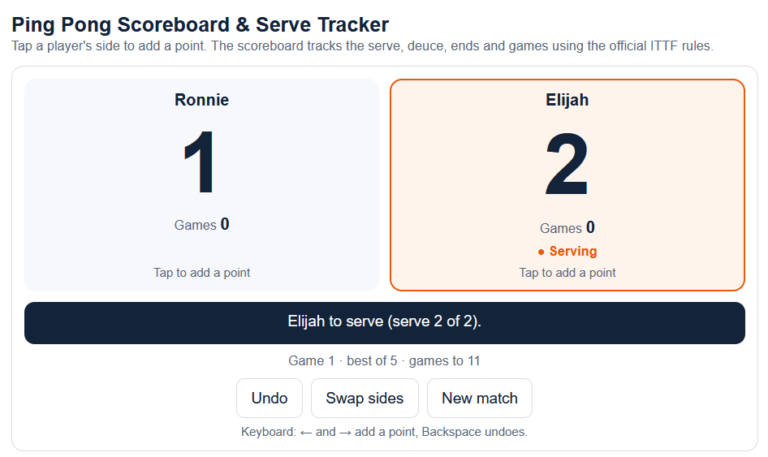
Keep score and never argue about whose serve it is again. This free ping pong scoreboard tracks points, games and the serve for singles and doubles, using the official ITTF rules. Tap a side to add a point. It works on any phone, tablet or laptop, with no app or sign-up needed.
Open the scoreboard full screen (great on a tablet next to the table)
What the Scoreboard Does
- Tracks the serve automatically: two serves each, then one each from 10-10 (ITTF Law 2.13.3). The serving side is highlighted, along with whether it’s the first or second serve.
- Handles deuce, game point and match point: games go to 11 and must be won by 2 (ITTF Law 2.11.1).
- Counts games: choose a single game or best of 3, 5 or 7 (ITTF Law 2.12.1).
- Tells you when to switch ends: after every game, and at 5 points in the deciding game (ITTF Law 2.13.7). The display swaps sides to match the table.
- Knows who serves first in the next game: whoever received first in the previous game (ITTF Law 2.13.6).
- Full doubles support: it shows who serves to whom, rotates the serving order (A→X, X→B, B→Y, Y→A) and handles the receiving-order change in the deciding game (ITTF Laws 2.13.4–2.13.6).
- Undo button for mis-taps, and keyboard shortcuts on a laptop: ← and → add points, Backspace undoes.
- Remembers your match if you refresh the page or your phone locks.
- Old-school option: switch to games to 21 with five serves each, the format used before 2001, if that’s your house rule.
How to Use It
- Choose singles or doubles, the match length and the player names.
- Pick who serves first. Officially this is decided by lot, such as a coin toss (ITTF Law 2.13.1). In doubles, also pick the first receiver.
- Tap Start match, then tap a player’s side every time they win a rally.
- When a game ends, switch ends and tap either side to start the next game.
Whose Serve Is It? The Quick Rule
If you’re mid-game without the scoreboard, use the quick check under the scoreboard, or work it out yourself: add both scores together and divide by two, ignoring any remainder. If the result is even, the player who served first in the game is serving; if it’s odd, the other player is. From 10-10, the serve simply alternates every point.
For everything about legal serves and scoring, read the complete ping pong rules, or keep the printable rules sheet next to the table.
Add the Scoreboard to Your Website
Run a club, school or game-room site? You’re welcome to embed the scoreboard for free. Copy and paste this code:
<iframe src="https://rulepingpong.com/wp-content/uploads/tools/ping-pong-scoreboard.html" title="Ping pong scoreboard" width="100%" height="760" style="border:0;"></iframe>
<p>Free <a href="https://rulepingpong.com/ping-pong-scoreboard/">ping pong scoreboard</a> by Rule Ping Pong</p>
Please keep the credit link.
Ping Pong Scoreboard FAQ
Is the ping pong scoreboard free?
Yes. It’s completely free, with no app, download or sign-up. It runs in your web browser on any device.
Does the scoreboard follow the official rules?
Yes. It follows the ITTF Laws of Table Tennis (2026 edition) for scoring, serving order, deuce, changing ends and doubles rotation. The optional 21-point mode follows the old pre-2001 format.
How do you know whose serve it is in ping pong?
Each player serves twice in a row, then the serve switches. From 10-10, it switches after every point. A quick check: add both scores, divide by two and ignore the remainder. An even result means the first server of the game is serving.
Does it work for doubles?
Yes. Enter all four names, pick the first server and receiver, and the scoreboard shows who serves to whom at every point, including the change of receiving order in the deciding game.
What happens if I tap the wrong side?
Press Undo to take the last point back. You can undo as many points as you need.
Last reviewed: October 2026. Rule numbers refer to the Laws of Table Tennis (ITTF Statutes, 2026 edition). The scoreboard doesn’t track the expedite system, time-outs or penalties.